how to create a design system
Lately, I’ve been reading Atomic Design by Brad Frost. This book introduces a methodology for thinking of our UIs as thoughtful hierarchies, discusses the qualities of effective pattern libraries, and showcases techniques to transform your team’s design and development workflow. Design Systems is one of the topics most talked about lately, also mentioned in the book. I want to be able to incorporate it in my own projects and also in my own future teams at work. In fact, I started building my own, for ‘Electrocute’ very beginner level but still learning.
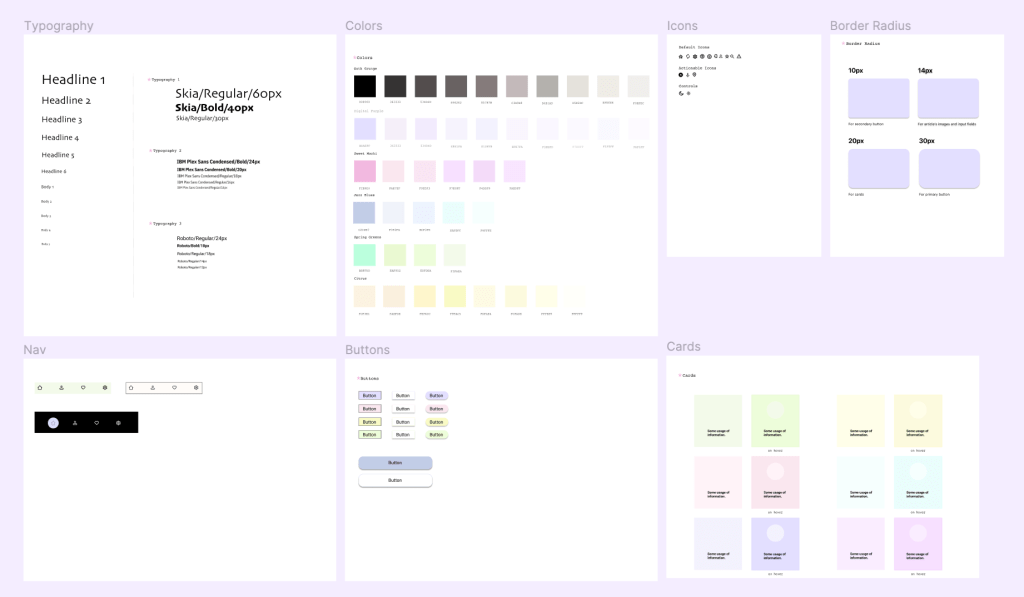
Why are design systems important you may ask? Design systems are crucial for ensuring consistency, efficiency, and scalability in design efforts. They provide standardized elements, streamline processes, and promote collaboration, resulting in a unified and user-friendly experience. Design systems also contribute to brand identity, accessibility, and faster iteration, ultimately building user trust and facilitating smoother development.
“The reality is that a design system is a multi-faceted layer cake, and also operates as part of other layered systems within an organization.” - Brad Frost
”design systems are systems of systems”
A design system often contains many subsystems that make an interface tick:
UI components and variants in design and code
Design tokens
Typography system
Color system
Layout/Grid system
Icon system
How to Create a Design System:
-
Define Goals and Objectives: Clearly articulate the purpose of your design system. Are you aiming for consistent branding, efficient design and development, improved user experience, or all of the above?
-
Gather Stakeholders: Involve key stakeholders from design, development, marketing, and other relevant teams to ensure a well-rounded perspective and buy-in.
-
Research and Analysis: Understand your target audience, industry trends, and competition. Gather insights on user needs and pain points, and analyze existing design assets for inconsistencies.
-
Visual Identity: Define your brand’s visual identity, including colors, typography, logo usage, and iconography. This forms the foundation for the visual language of your design system.
-
Design Principles: Establish a set of design principles that guide decision-making. For instance, principles like simplicity, consistency, and accessibility can shape your design system’s approach.
-
Components and Patterns: Identify and document reusable design components such as buttons, forms, headers, footers, and more. Create guidelines for their appearance, behavior, and usage.
-
Layout and Grid: Establish layout principles and a grid system that maintains consistency and alignment across different screen sizes and devices.
-
Typography: Specify font choices, sizes, weights, line heights, and spacing guidelines to ensure a consistent and readable typographic hierarchy.
-
Color Palette: Define primary, secondary, and accent colors along with their intended usage. Provide guidance on color combinations for different contexts.
-
Iconography: Create a set of icons that align with your brand’s style and purpose. Define guidelines for usage, sizing, and scaling.
-
Motion and Interaction: Outline principles for animations, transitions, and micro-interactions that enhance user experience while maintaining consistency.
-
Accessibility Guidelines: Ensure your design system adheres to accessibility standards, making it usable by people with disabilities. Provide guidelines for contrast, typography, and interaction.
-
Content Guidelines: Define guidelines for writing style, tone, and voice that reflect your brand’s personality and resonate with your target audience.
-
Documentation: Compile all the design system guidelines and assets in a comprehensive and easily accessible format. This could be a website, a PDF document, or a dedicated platform.
-
Testing and Iteration: Continuously test and iterate on your design system with real-world applications. Gather feedback from designers, developers, and users to identify areas of improvement.
-
Version Control: Implement a version control system to manage updates and changes to your design system over time.
-
Training and Onboarding: Provide training sessions and resources for your teams to understand and implement the design system effectively.
-
Maintenance: Assign responsibilities for maintaining and updating the design system regularly to accommodate new design trends, technologies, and user needs.
Investing time and effort into creating a comprehensive content design system will pay off in the long run with a more intuitive, accessible, and user-friendly product. If you’re searching for a tool that will help you build prototypes with your design library components then check out:
Resources:
Atomic Design by Brad Frost
https://atomicdesign.bradfrost.com/
Design System 101